doula marketingwebsitepublic profileaccessibilityuk
What your doula website needs before you send families to it
Help families understand your support, costs and availability. A practical guide to a clear public page, an accessible enquiry route and honest information.

Someone has heard your name, followed a recommendation or opened your directory profile. They arrive with a practical question: could this person offer the support I am looking for?
Your page does not need to answer every question about birth or postnatal life. It does need to explain your service, help someone judge whether it might fit and show them a clear way to ask.
This is a guide to making that page useful once someone reaches it. It applies whether you have a full website, a directory listing or a single public profile. A clear page cannot guarantee enquiries or bookings, but it can stop avoidable uncertainty from getting in the way.
Make the first screen answer three questions
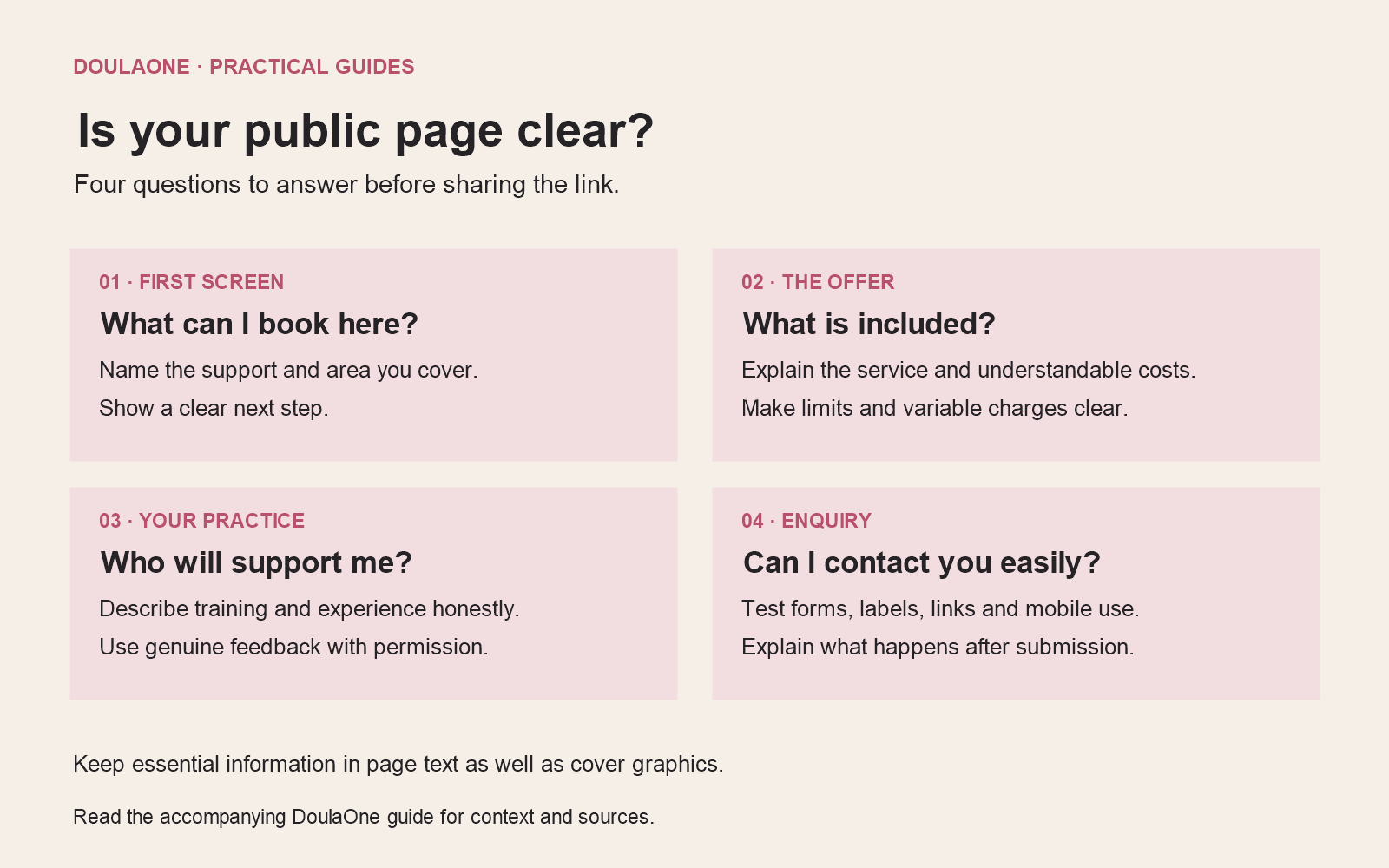
Before choosing a new colour palette or writing a longer biography, check whether a visitor can identify what you offer, where you work and how to take the next step.
“Care through every chapter” may express something you value. On its own, it does not tell someone whether you offer birth support, overnight postnatal help or antenatal classes, or whether you can travel to their area.
An illustrative opening could be:
Daytime postnatal support in Sheffield and nearby areas. Practical help at home, space to rest and a listening ear as you settle into life with your baby. Ask about current availability.
Use words that describe your real service and scope. If you work online, explain what is available remotely. If you have a travel boundary, describe it clearly enough for someone to decide whether to enquire. You can clarify exact locations privately without publishing a client’s address or your own daily movements.
Put the main contact action near this introduction. “Ask about availability” sets a different expectation from “Book a visit”. Choose wording that matches what happens after someone clicks.
Explain what support looks like in practice
A list of values is useful when it connects to the experience you offer. Give visitors a few concrete details: the kinds of support included, how visits or conversations are arranged, and what sits outside your role.
For a birth package, explain the main components and how you discuss on-call and backup arrangements. For postnatal support, describe typical visit length, the tasks you can agree to help with and any limits the family needs to understand. Avoid making the whole service sound fixed if it is genuinely tailored.
Include the practical information that could change someone’s decision. That might be daytime rather than overnight availability, languages you use, your travel area or whether sessions take place in an accessible venue. Explain how people can ask about adjustments or another contact format.
Do not promise an outcome you cannot control. You can describe your approach to listening, preparation and practical support without implying that booking you guarantees a particular birth experience.
Make costs understandable before the call
Show the total price for a defined service where you can. If you offer several packages, help readers see the actual differences rather than relying on names such as “Essential” and “Complete”.
Where a price varies, explain what changes it. For example, travel outside a stated area or additional agreed hours may affect a quote. A starting price needs enough context to be meaningful; it should not be the price for a version almost nobody can book.
If you offer instalments, distinguish the package total from the amount due at each stage. If you discuss reduced-fee places, say how someone can ask without requiring them to tell a personal story in a public comment.
Your page, quote and agreement should tell a consistent story. The page is not a substitute for the information and terms needed before a booking is agreed. The CMA’s fair-contract guidance explains why clear wording alone is not enough if a term is unfair. Have cancellation and payment wording checked for your actual service.
Help people understand who will arrive
A current photograph of you can help visitors connect the page with the person they may meet. It does not have to look like a magazine shoot. Use an image you have the right to publish and that represents you honestly.
Keep that distinction clear when using other imagery. A stock or generated scene can illustrate a topic, but it should not be presented as your portrait, your client or evidence of a birth you attended. A photograph of a real client also needs appropriate permission for the intended use.
Describe your training and experience accurately. State what you have completed, what kind of support you offer and whether mentoring or other arrangements form part of your practice. Avoid wording that could imply clinical qualifications or registration you do not hold.
If you publish testimonials, use genuine feedback with permission and enough context to avoid misleading readers. Do not invent a quote to fill an empty section. A newer practitioner can make their approach understandable through clear explanations and honest experience, without pretending to have a larger practice.
Keep the enquiry form focused
Ask for the information needed to respond at this stage. Depending on your service, that may be a name, contact route, general area, approximate timing and type of support. Include an optional message where someone can explain what they are looking for.
Consider whether a full address, exact due date or detailed history is necessary before you have established availability. The ICO’s data-minimisation guidance asks you to match the information collected to a defined purpose. A form does not need to double as a full intake record.
Explain what happens after submission and your usual reply window. If you are away or fully booked for certain dates, update that message. Offer a practical alternative contact method where possible, and make clear that the form is not an urgent-help route.
Make your privacy information easy to find at the point of enquiry. Keep any newsletter choice separate from asking about a service. A visitor should be able to contact you without being silently added to a promotional mailing list.
Check whether the page is usable
Open the page on your phone and try the actual task: find the service, understand the cost and send an enquiry. Then ask someone unfamiliar with your practice to do the same without your explanation.
Use the W3C’s accessibility checks as a starting point. Check that text can be enlarged, headings are meaningful, keyboard focus is visible, form fields have labels and error messages help someone recover. Check contrast and provide suitable text alternatives for informative images. These are initial checks, not proof of full accessibility.
Keep essential information in page text, even if it also appears in a cover graphic. A striking headline inside an image should not be the only place a visitor can find your offer or contact details. Use descriptive button and link text so someone knows what will open.
Choose the page you can keep accurate
You may not need a new website to fix a confusing offer. First decide where your most complete, current information will live. Keep the essentials consistent wherever you are listed and check the pages after changes to fees, services or availability.
On DoulaOne, the free directory listing includes a public profile, enquiry form and service packages. The customisable link-in-bio booking page and practice-management tools are paid features. Choose based on what you need now; a free listing and a paid booking page are not the same product.
Make a small maintenance routine: test the form, check where enquiries arrive, review the visible service area and remove outdated offers. Test booking links against times you can actually offer, including the effect of on-call work.
Before sharing your link again, ask a final question: could someone who has never met me understand what I offer and how to ask about it? Fix the first unclear answer. That improvement may be more useful than adding another page.