
25 November 2026
Your backup joins your families.
No practice of their own needed.
Most backups set up their own practice when they join. Some don't, for example when they sign up with Google from your invite. Until now they couldn't open anything: every page sent them to set up a practice, and that page sent them straight back.
Backup doulas
Straight to the families you share
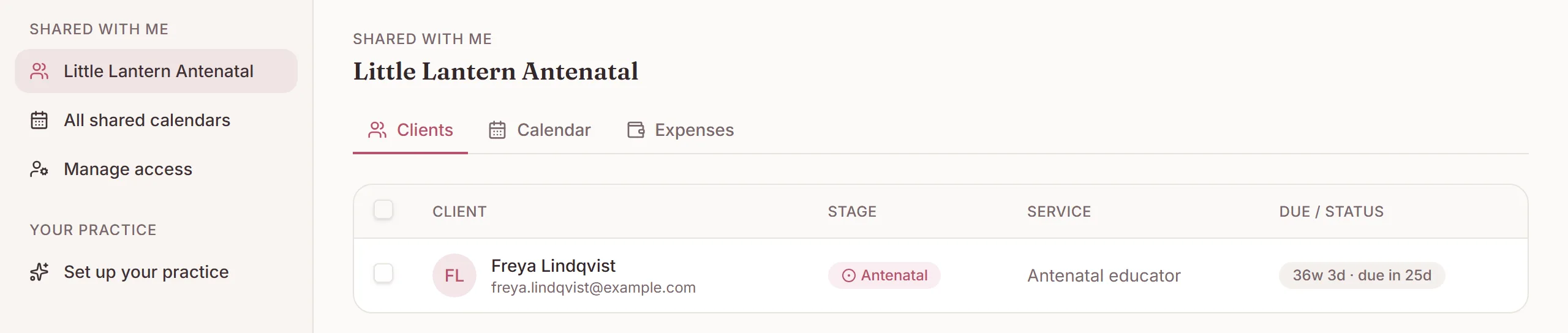
When a backup without a practice of their own signs in, they land on the families you've shared with them. If more than one practice shares with them, they land on Shared with me.
Their sidebar shows only what's shared with them: your families and calendar, all their shared calendars together, and Manage access. Pages that need a practice of their own, such as the dashboard or Settings, take them back to what's shared with them.
Setup
Their own practice, when they're ready
Set up your practice in their sidebar opens the usual setup. They keep their access to your families either way, and Not now, back to Shared with me takes them back.
If your plan drops below Pro, sharing pauses until you're back. A backup who opens your families meanwhile now sees a note on Shared with me saying why.
Need a hand?
Stuck on this update?
Write to us.
Tell us which note you were following, and the workspace email you sign in with. We aim to reply within one to two business days.